How to Set Up a Solana Transaction Sender with Syncro Sender
Introduction
If your execution depends on transaction landing, set up speed matters.
Syncro Sender is designed to integrate directly into your existing flow with minimal changes. You can start sending transactions in minutes using either a public or a private endpoint.
This guide walks through how to set up Syncro Sender and start sending transactions immediately. For a full technical reference, see the Syncro Sender documentation.
What You Need Before Starting
Before using Syncro Sender, make sure you have:
A signed Solana transaction
Base64 encoded transaction data
A standard RPC endpoint for reads such as blockhash and confirmation
Syncro Sender is used for transaction delivery, not simulation or state queries.
Step 1: Choose Your Endpoint
Syncro Sender supports two access modes.
Public endpoint (no API key)
No authentication required
Requires a tip of 0.0001 SOL (100,000 lamports) inside the transaction
Rate limited to 1 request per second
Best for quick testing
Available endpoints:
Frankfurt: http://sfls-geo-fra.l2.p2p.org/public
New York: http://sfls-geo-nyc.l2.p2p.org/public
London: http://sfls-geo-lon.l2.p2p.org/public
Tokyo: http://sfls-geo-tky.l2.p2p.org/public
Singapore: http://sfls-geo-sgp.l2.p2p.org/public
Amsterdam: http://sfls-eu1.l2.p2p.org/public
Private endpoint (API key)
Requires API key authentication
Requires a tip of 0.001 SOL (1,000,000 lamports). For the first month, the tip is reduced to 0.0001 SOL as part of the production benchmark period
Supports up to 50 requests per second
Supports full RPC methods
To get access, request it via the Syncro Sender page or contact the team.
Step 2: Add a Tip to Your Transaction
A tip is required for both public and private endpoints.
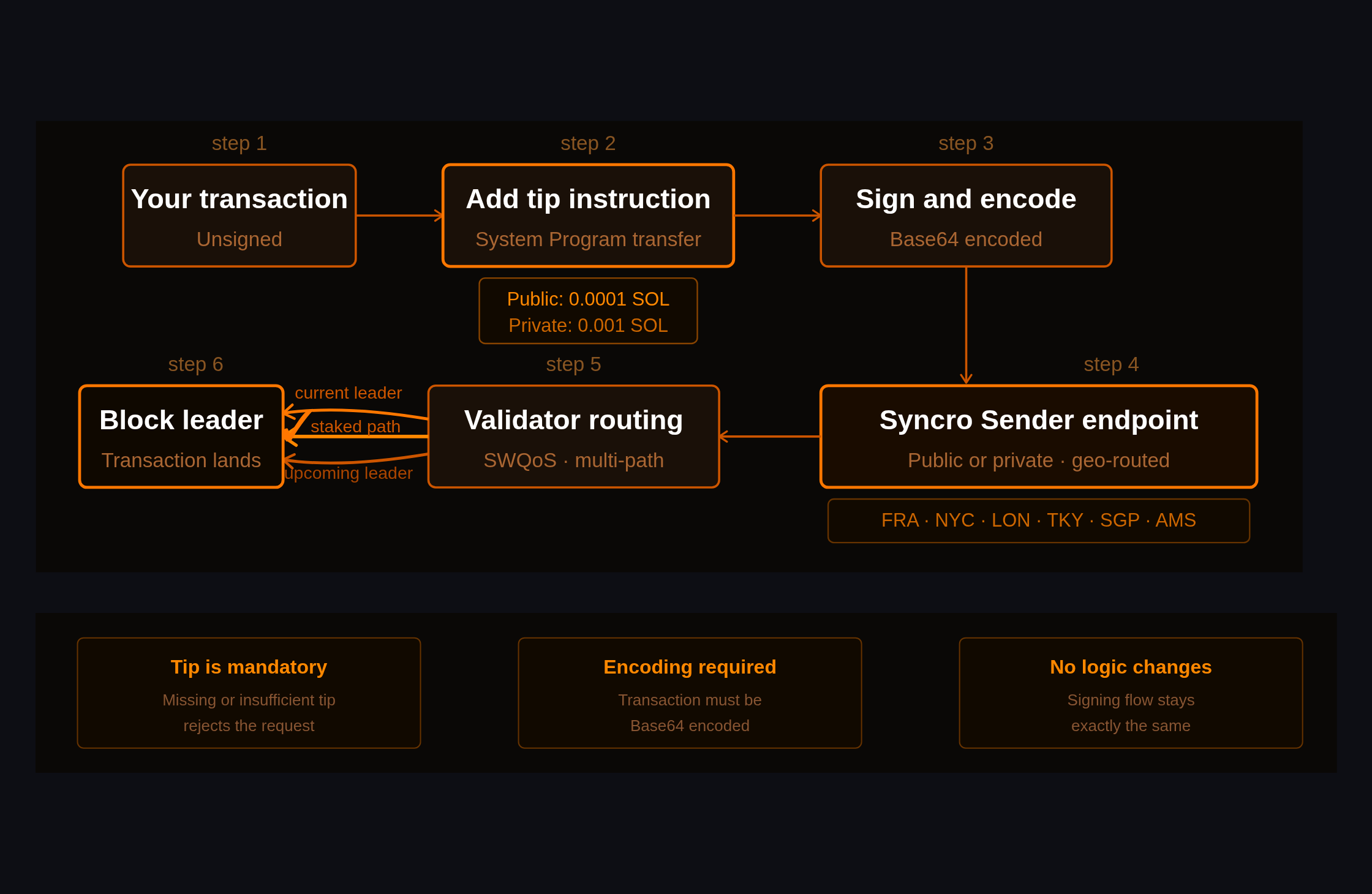
How a tip-enabled transaction reaches the block leader.
Minimum tip
Public: 100,000 lamports (0.0001 SOL)
Private: 1,000,000 lamports (0.001 SOL)
How to add the tip
Add a System Program transfer instruction to a valid tip account:
Once integrated, test Syncro Sender alongside your current setup.
Focus on:
landing success rate
time to confirmation
consistency under load
Use your standard RPC to monitor transaction status. Private endpoint users can also use Syncro Sender for all standard Solana RPC requests, including status checks and confirmation queries.
Performance Best Practices
To get the best results:
Use skipPreflight: true to reduce latency
Use base64 encoding
Reuse HTTP connections with keep alive
Add a priority fee for validator scheduling
Retry strategy
429 → wait and retry
500 → retry with backoff
400 → fix request
network error → retry
Submitting the same transaction multiple times is safe.
Common Mistakes to Avoid
Sending transactions without a tip
Using Syncro Sender for read requests on the public endpoint
Not adding priority fees for competitive execution
Opening new connections for every request
Ignoring rate limit headers
When to Use Public vs Private
Use case
Recommendation
Testing
Public endpoint
Production trading
Private endpoint
High frequency workflows
Private endpoint
What This Setup Actually Changes
Syncro Sender does not change your transaction logic.
It changes how your transactions are delivered.
That means:
better routing
higher landing probability
more consistent execution
Get Started
You can start immediately using the public endpoint.
For production use cases, request access to the private endpoint.
<h2 id="what-actually-happens-between-submission-and-execution">What actually happens between submission and execution</h2><p>Speed is often treated as the defining feature of Solana.</p><p>What is less understood is what happens between submission and landing, and why two transactions sent at the same time can end up with completely different outcomes.</p><p>For teams running execution-critical workflows such as arbitrage, liquidations, or high-frequency strategies, performance is not defined by how fast a transaction is sent. It is defined by whether it gets to the leader in time.</p><p>These are the observations we made while building Syncro Sender, P2P.org's Solana transaction sender built for execution-critical teams. We are sharing them here because the patterns we found are not specific to our infrastructure. They reflect how Solana transaction delivery works at the network level.</p><p>Our <a href="https://p2p.org/economy/solana-transaction-landing-speed-routing/">previous post</a> reframes the problem: Solana transaction landing is not a speed problem, it is a routing problem. This post goes one level deeper and explains the system behind it: what the delivery path actually looks like, where it breaks, and what changes when you build infrastructure around it.</p><h2 id="quick-lessons-for-builders">Quick Lessons for Builders</h2><ul><li>Transaction landing depends on delivery, not submission timing</li><li>Routing quality matters more than endpoint speed</li><li>Stake-weighted connections determine delivery priority</li><li>Single-path submission breaks under congestion</li><li>Tail latency defines real execution performance</li></ul><h2 id="what-is-solana-transaction-delivery">What Is Solana Transaction Delivery</h2><p>Solana transaction delivery is the process of getting a transaction from submission to the block leader before the slot closes.</p><p>Each slot has a designated leader. If your transaction does not reach that leader in time, it does not land.</p><p>In practice, four things decide that outcome:</p><ul><li>routing path quality</li><li>stake-backed priority</li><li>delivery strategy (single vs multi-path)</li><li>transaction construction</li></ul><p>Priority fees affect ordering once the transaction arrives. Compute limits and blockhash freshness affect inclusion.</p><p>But none of that matters if the transaction never makes it to the leader.</p><h2 id="why-transactions-with-the-same-timing-have-different-outcomes">Why Transactions with the Same Timing Have Different Outcomes</h2><p>Two transactions sent at the same time do not take the same path.</p><p>One may move through prioritized connections with stable bandwidth. Another may compete through shared infrastructure alongside thousands of other transactions.</p><p>Under low load, the difference is small.</p><p>Under congestion, it becomes decisive.</p><p>On Solana, a few milliseconds is not a rounding error. It is the difference between landing in the current slot or missing it entirely.</p><h2 id="what-happens-between-submission-and-the-leader">What Happens Between Submission and the Leader</h2><p>Once submitted, a transaction is forwarded to current and upcoming leaders via QUIC.</p><p>From there, everything depends on:</p><ul><li>connection quality</li><li>routing efficiency</li><li>available bandwidth</li></ul><p>With approximately 390ms slot times, the margin for error is minimal.</p><p>Most variance does not come from when a transaction is sent. It comes from how it is forwarded under load.</p><h2 id="where-public-rpc-falls-short">Where Public RPC Falls Short</h2><p>Public RPC is built for accessibility, not for winning under load.</p><p>That tradeoff shows up in three ways:</p><ul><li>shared bandwidth with no prioritization</li><li>limited control over routing paths</li><li>high variability during peak demand</li></ul><p>Average performance may look fine. But under real conditions, consistency breaks down, and consistency is what execution depends on.</p><h2 id="the-role-of-stake-weighted-qos-in-delivery">The Role of Stake-Weighted QoS in Delivery</h2><p>Stake-weighted QoS operates at the network layer.</p><p>Leaders allocate a significant share of bandwidth to staked connections. Transactions using those connections are less likely to be delayed during congestion.</p><p>This happens before fees come into play.</p><p>Fees decide ordering. Routing decides whether your transaction even gets a chance to be ordered.</p><h2 id="why-connectivity-and-network-positioning-matter">Why Connectivity and Network Positioning Matter</h2><p>With approximately 390ms slots, distance is measured in milliseconds, not in geography.</p><p>What matters is:</p><ul><li>how many hops your transaction takes</li><li>how strong those connections are</li><li>how directly you can reach the leader</li></ul><p>Because the leader rotates continuously, performance depends on consistent access across the validator set, not proximity to a single location.</p><h2 id="why-single-path-delivery-breaks-under-load">Why Single-Path Delivery Breaks Under Load</h2><p>Single-path delivery relies on one route working.</p><p>Under peak demand, that assumption breaks.</p><p>If that path is congested or delayed, there is no fallback already in motion. By the time you retry, the slot is gone.</p><p>This is where tail latency matters. A system that works most of the time but fails when it matters most is not reliable.</p><figure class="kg-card kg-image-card kg-card-hascaption"><img src="https://p2p.org/economy/content/images/2026/03/Solana-transaction-delivery-path.png" class="kg-image" alt="Solana transaction delivery path: single path vs multi-path" loading="lazy" width="1600" height="900" srcset="https://p2p.org/economy/content/images/size/w600/2026/03/Solana-transaction-delivery-path.png 600w, https://p2p.org/economy/content/images/size/w1000/2026/03/Solana-transaction-delivery-path.png 1000w, https://p2p.org/economy/content/images/2026/03/Solana-transaction-delivery-path.png 1600w" sizes="(min-width: 720px) 720px"><figcaption><span style="white-space: pre-wrap;">Solana transaction delivery path: single path vs multi-path</span></figcaption></figure><h2 id="what-changes-with-multi-path-delivery">What Changes with Multi-Path Delivery</h2><p>Multi-path delivery changes the model completely.</p><p>Instead of relying on one route, transactions are sent across multiple paths at once:</p><ul><li>toward current leaders</li><li>toward upcoming leaders</li><li>through prioritized connections</li></ul><p>Whichever path reaches the leader first determines the outcome.</p><p>The goal is no longer to hope one path works, but to ensure at least one does.</p><h2 id="what-teams-should-measure-instead">What Teams Should Measure Instead</h2><p>If you are measuring performance under average conditions, you are measuring the wrong thing.</p><p>What matters is how your infrastructure behaves under stress.</p><p>The key metrics:</p><ul><li>slot landing distribution</li><li>tail latency during congestion</li><li>drop rate (submitted vs landed)</li><li>performance at peak demand</li></ul><p>That is where execution is won or lost.</p><h2 id="what-most-teams-misunderstand">What Most Teams Misunderstand</h2><p>The most common mistake is assuming higher fees improve landing probability.</p><p>They do not.</p><p>Fees only affect ordering after a transaction reaches the leader.</p><p>Another misconception is treating a successful submission as success. A response only confirms the transaction was received. It does not confirm that it landed.</p><p>And average performance is misleading. On Solana, worst-case outcomes define your edge.</p><h2 id="a-practical-step-to-improve-delivery">A Practical Step to Improve Delivery</h2><p>The simplest way to improve performance is to stop relying on a single path.</p><p>Adding a parallel delivery route allows you to compare real outcomes under real conditions without replacing your existing setup.</p><p>It is a small change that makes delivery visible and measurable.</p><h2 id="where-the-ecosystem-is-moving">Where the Ecosystem Is Moving</h2><p>Execution-focused teams are moving toward delivery-aware infrastructure.</p><p>The shift is simple: from sending transactions to controlling how they are delivered.</p><p>If you want to understand why routing is the root cause before diving into the system, the <a href="https://p2p.org/economy/solana-transaction-landing-speed-routing/">previous post</a> covers that ground. This post is the next step: the mechanism behind the problem, and what it takes to solve it at the infrastructure level.</p><p>Syncro Sender is built on these principles. Validator-level routing, multi-path delivery, and SWQoS-enabled connections, deployed across Amsterdam, Frankfurt, New York, London, Tokyo, and Singapore. Add it as a parallel submission path alongside your current setup and compare landing performance on real flow.</p><p><a href="https://www.p2p.org/products/syncro-solana-transaction-sender?ref=p2p.org">Start here.</a></p><h2 id="key-takeaway">Key Takeaway</h2><p>On Solana, speed does not decide outcomes.</p><p>Delivery does.</p><h2 id="faq">FAQ</h2><h3 id="what-is-solana-transaction-delivery-1">What is Solana transaction delivery?</h3><p>It is the process of getting a transaction from submission to the block leader in time for inclusion in a slot.</p><h3 id="why-do-transactions-fail-to-land-on-solana">Why do transactions fail to land on Solana?</h3><p>Because they arrive too late, compete under congestion, or fail due to constraints like blockhash expiry or prioritization.</p><h3 id="do-priority-fees-improve-transaction-landing">Do priority fees improve transaction landing?</h3><p>No. They affect ordering after arrival, not whether the transaction reaches the leader in time.</p><h3 id="what-improves-transaction-delivery-performance">What improves transaction delivery performance?</h3><p>Better routing, prioritized connections, multi-path delivery, and optimized infrastructure placement.</p>
 ALL
Agoric
Aptos
Auth
Avail
Avalanche
Axelar
Babylon
Bitcoin
BTC
Cardano
Celestia
Chainlink
Cosmos
Crescent
Cyberway
DAOBet
DeFi
DVT
Dymension
Economy
Education
EigenLayer
Elrond
Ethereum
Evmos
Explain Like I'm Five
Guide
how to
HR
infrastructure
Kava
Kusama
landing
Lido
LSP
Manta
Mantle
Marlin
Matic
Moonbeam
MultiversX
Near
News
NuCypher
Oasis
Origin
Partnership
Persistence
playbook
Pocket
Polkadot
Polygon
product
products
Quicksilver
Regen
Renzo
restaking
RPC Node
Sender
Serum
slashing
Solana
SSV.Network
Staking
Starknet
Sui
symbiotic
Syncro
syncro sender
Terra
Tezos
TheGraph
Threshold
Update
validator
Vara
Vega
ALL
Agoric
Aptos
Auth
Avail
Avalanche
Axelar
Babylon
Bitcoin
BTC
Cardano
Celestia
Chainlink
Cosmos
Crescent
Cyberway
DAOBet
DeFi
DVT
Dymension
Economy
Education
EigenLayer
Elrond
Ethereum
Evmos
Explain Like I'm Five
Guide
how to
HR
infrastructure
Kava
Kusama
landing
Lido
LSP
Manta
Mantle
Marlin
Matic
Moonbeam
MultiversX
Near
News
NuCypher
Oasis
Origin
Partnership
Persistence
playbook
Pocket
Polkadot
Polygon
product
products
Quicksilver
Regen
Renzo
restaking
RPC Node
Sender
Serum
slashing
Solana
SSV.Network
Staking
Starknet
Sui
symbiotic
Syncro
syncro sender
Terra
Tezos
TheGraph
Threshold
Update
validator
Vara
Vega