Delegating (staking) your Story ($IP) tokens is a straightforward way to put your assets to work while supporting the security and decentralization of the Story network. Whether you’re new to staking or just want a smoother experience, this guide walks you through the full process using the official Story staking interface for unlocked $IP.
We’ll show you how to:
Get your unlocked $IP ready
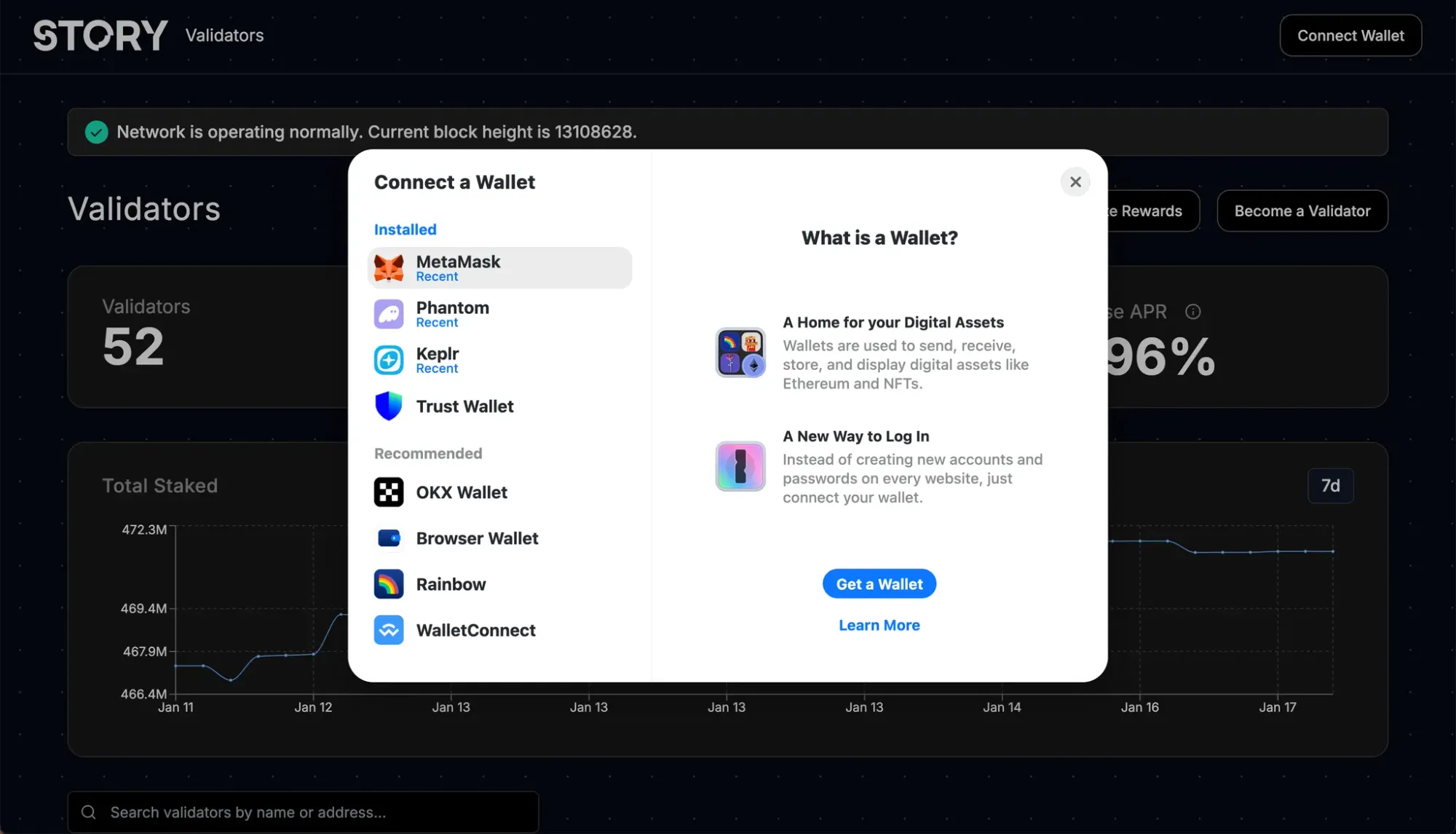
Connect a supported wallet
Choose a validator and stake your tokens
Understand reward timing, unbonding, and key risks
By following this process, your stake can start accruing rewards shortly after it becomes active.
Important: Unlocked vs Locked $IP (Read First)
Story supports two token types:
Unlocked $IP: freely transferable tokens (tokens bought from the market). This guide covers unlocked staking only.
Locked $IP: tokens subject to a lock/vesting schedule. Locked $IP can typically be staked via a separate investor/locked-token interface, and earns rewards with a lower multiplier than unlocked staking.
If your tokens are locked, use the locked staking flow provided through your investor/locked-token portal. This guide focuses only on the unlocked-token experience.
Prerequisites
1) Get your $IP ready
Before you begin, make sure you own some Story ($IP). You can purchase $IP on supported cryptocurrency exchanges and withdraw it to a non-custodial wallet that works with the Story staking interface (for example, an EVM-compatible wallet like MetaMask).
Once your $IP is in your wallet, keep a small buffer available for network fees. Some actions require a protocol fee in $IP (for example, unstaking costs 1 IP), so avoid staking your entire balance down to zero.
2) Use the official Story staking interface
This guide follows the flow provided by Story’s official staking interface. The steps involve selecting a validator and signing transactions in your wallet.
3) Estimate rewards with the staking dashboard
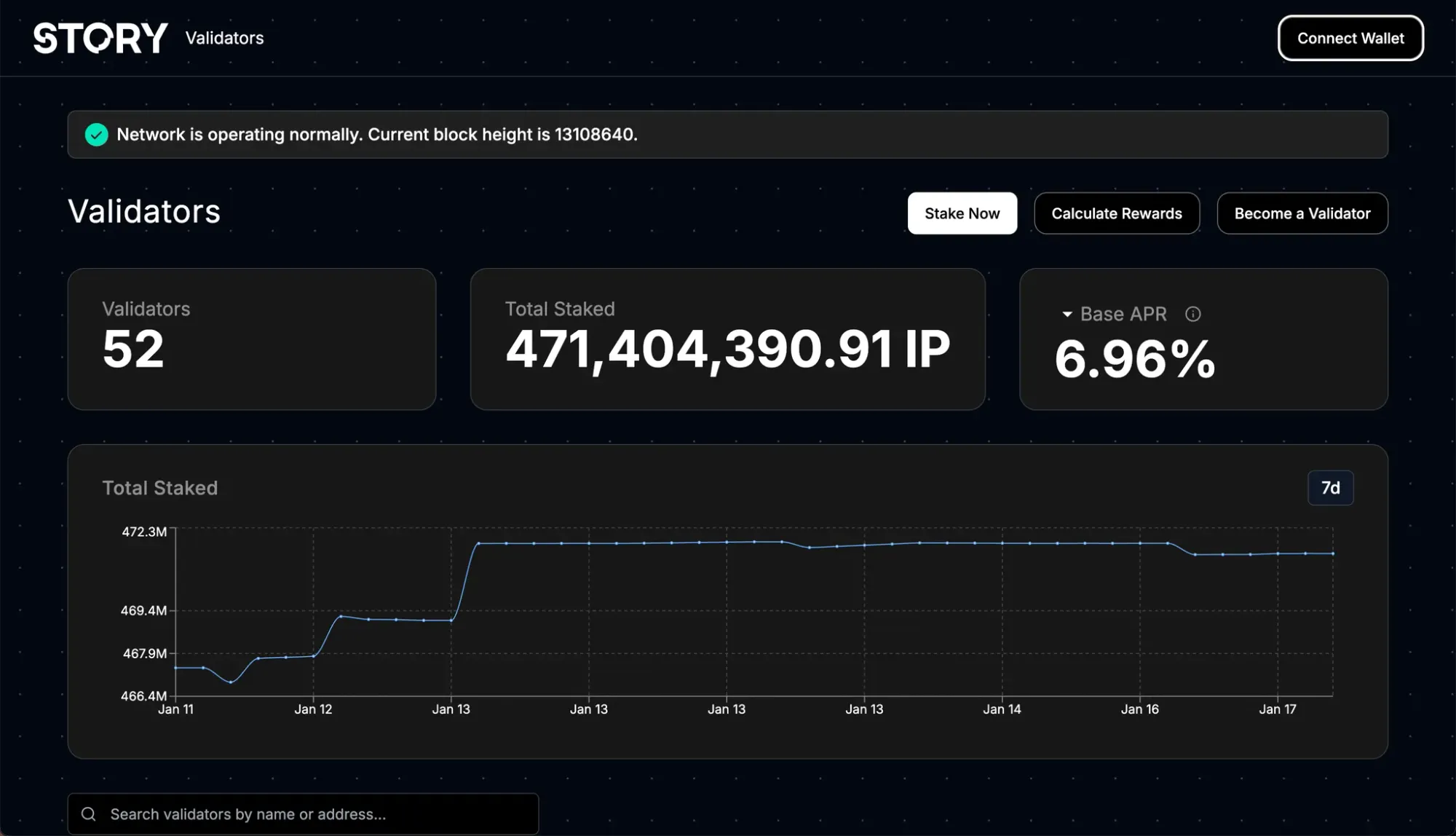
If you want a rough sense of expected returns, click Calculate Rewards button on Story’s official staking interface. Set your intended staking amount and choose the lock-up term to view the estimated rewards. Estimates are indicative and may change over time as network conditions and APR parameters update.
Once connected, you’ll see your available $IP balance and your current staking status.
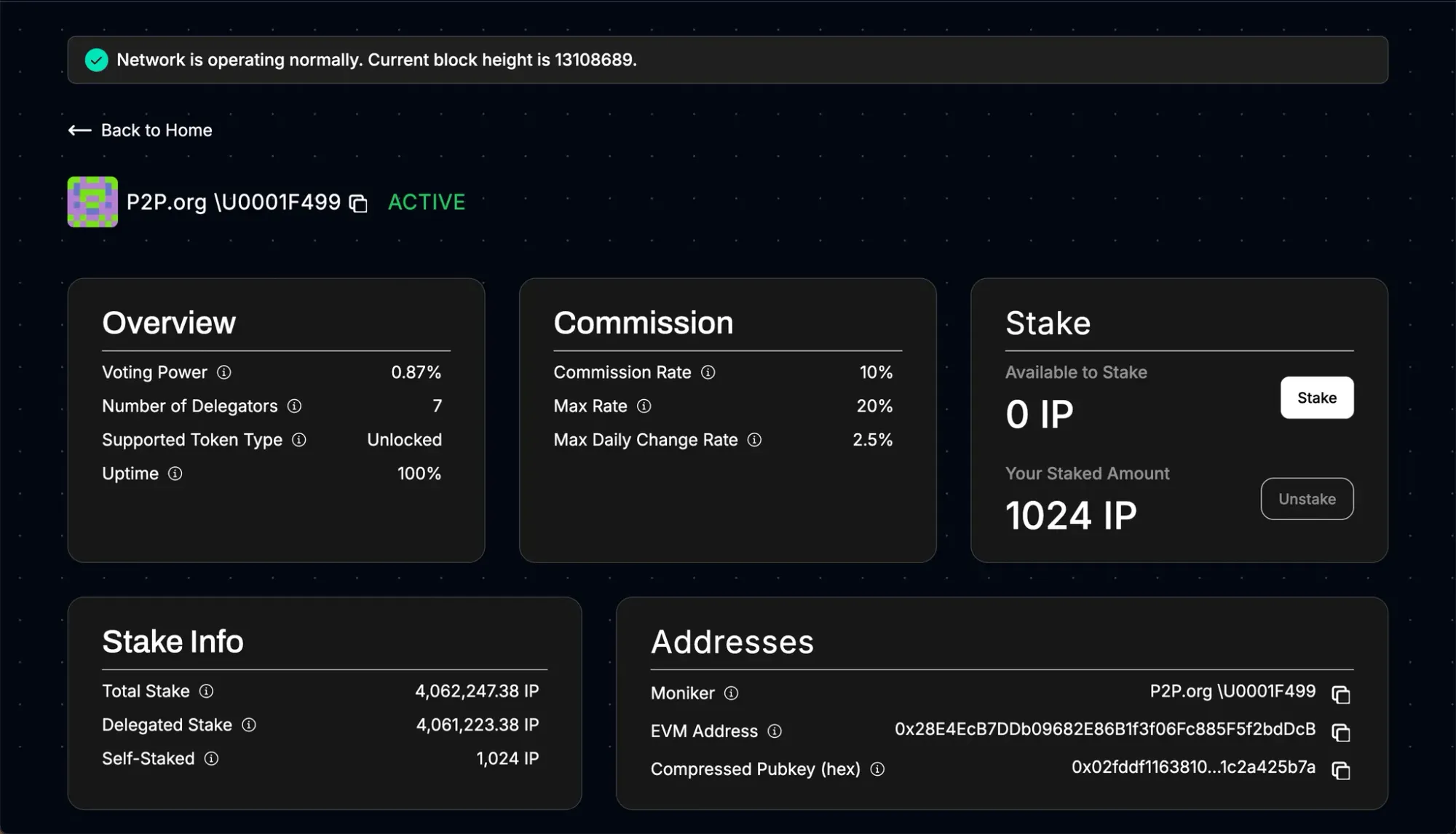
Step 3: Choose a Validator
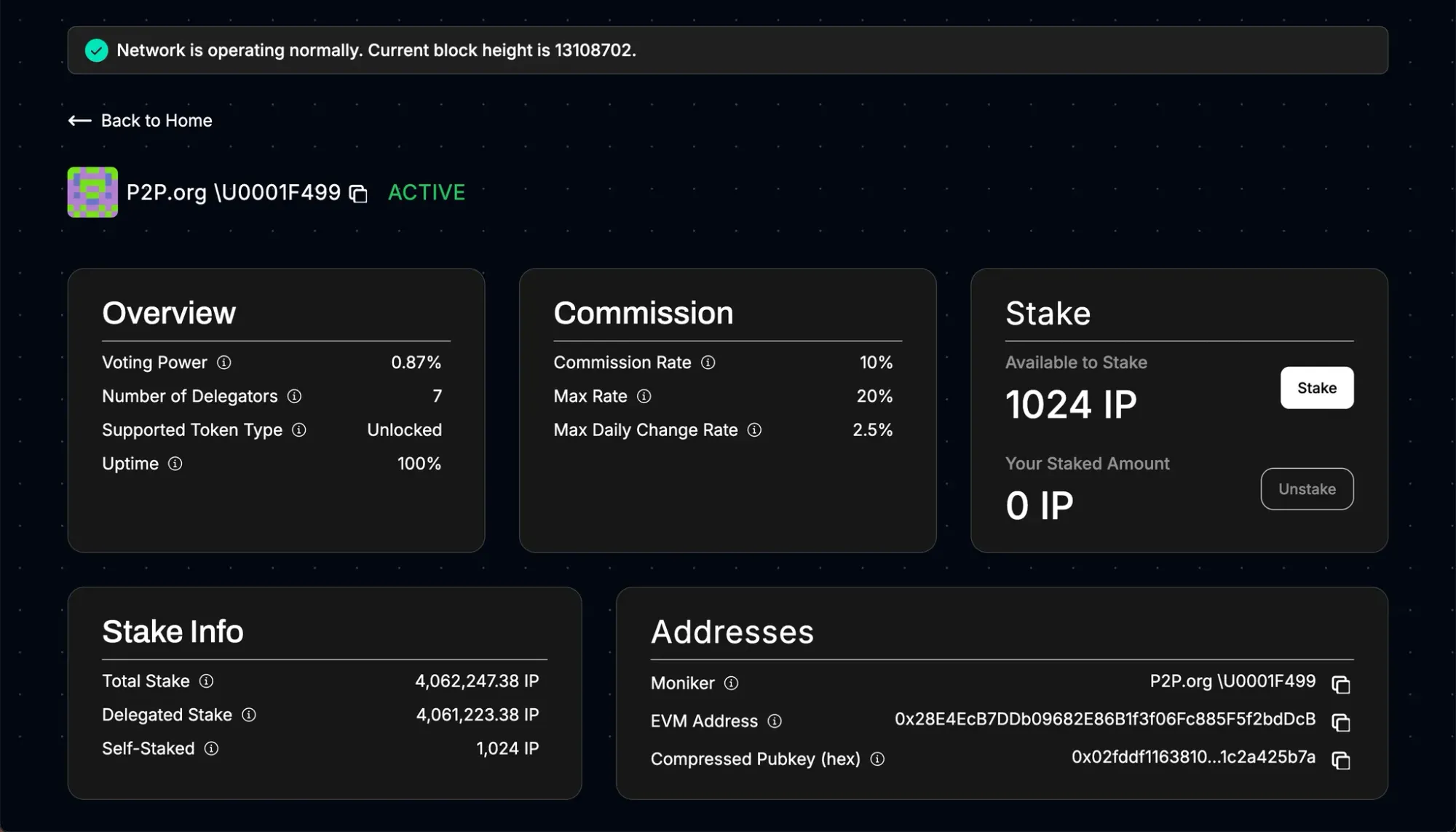
Browse or search the validator list (for example, P2P.org). When comparing validators, pay attention to:
Validator name and track record
Commission rate (validator fee)
Any notes/terms shown in the interface
Click into the validator you want to use.
Step 4: Start Staking (Delegate) Your $IP
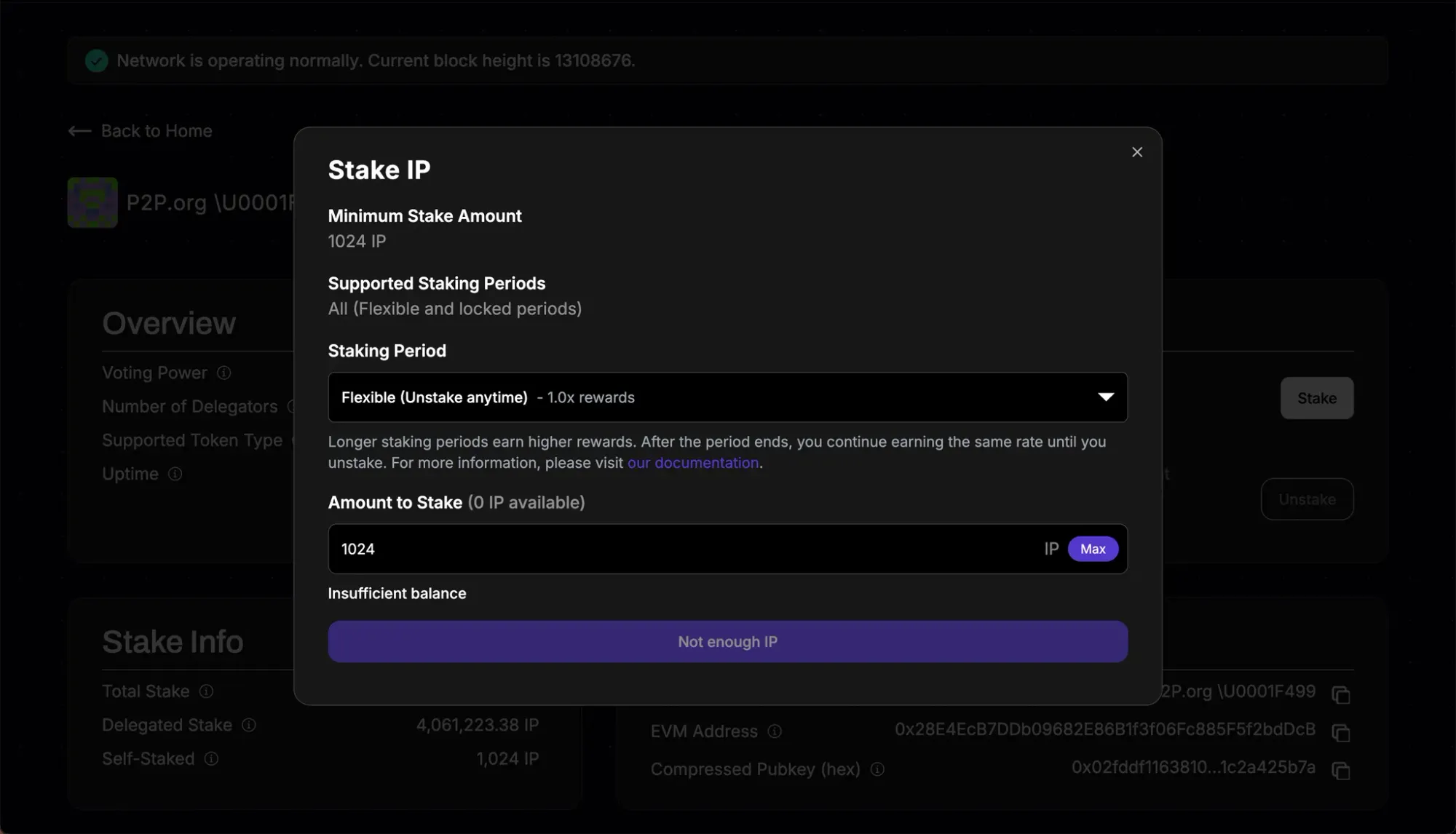
Click Stake.
In the staking window:
Enter the amount of $IP you want to stake.
Minimum delegation is 1,024 IP.
Select your staking option (if shown):
Flexible (no fixed end date)
or a fixed staking period (e.g., 90 / 360 / 540 days) that may increase your reward multiplier.
Then click Stake (or Stake IP) to proceed.
Step 5: Review and Sign the Transaction
Your wallet will prompt you to confirm the transaction.
Review the details (amount, validator, and any staking-period selection).
Confirm/sign in your wallet.
Wait for on-chain confirmation.
Step 6: Verify and Refresh
After the transaction is confirmed:
You should see a success/confirmation message in the staking interface.
If the UI provides a transaction link, click it to view the transaction in the explorer.
Refresh the validator page (if needed) to see your updated staked balance.
That’s it! Your unlocked $IP is now staked and will begin accruing rewards once active.
Rewards: What to Expect
Rewards accrual vs payout
Rewards accrue per block once your stake is active.
Rewards are paid out automatically only when your accrued rewards exceed 8 IP (then distributed through a payout queue).
Validator commission
Validators take a commission from rewards before the remainder is distributed to delegators. The commission rate is shown in the validator details.
Unstaking and Redelegating
Redelegating to a different validator (optional)
If you want to switch validators, use Redelegate in the staking interface. Redelegation is typically effective in the same block, but is only available between validators that support the same token type (unlocked to unlocked).
Unstaking (undelegating)
When you want to exit:
Click Unstake in the staking interface.
Unstaking costs 1 IP.
If you used a fixed staking period, unstaking is only available after the period matures.
After unstaking, your stake enters a 14-day unbonding period:
You do not earn rewards during unbonding
You may still be slashing-exposed during this time
After unbonding completes, your withdrawal is processed via the network’s withdrawal queue.
Partial unstaking is supported, but protocol minimums apply (including a 1,024 IP minimum for undelegation actions).
Risks and Considerations (Read Before You Stake)
Slashing risk: Delegating to a validator can expose you to slashing if the validator violates protocol rules.
Unbonding delay: Funds are not instantly available after unstaking due to the 14-day unbonding requirement.
Fixed-period constraints: If you choose a fixed staking period, you may be unable to unstake/redelegate until the period ends.
We collaborate with leading custodians and institutional staking providers to deliver secure, compliant, and seamless Story ($IP) staking solutions. If you need a custom integration, contact us via p2p.org (chat icon in the bottom-right corner) and we’ll help you find the best path forward.
Subscribe to P2P-economy
Get the latest posts delivered right to your inbox
<p></p><h2 id="tldr"><strong>TL;DR:</strong></h2><ul><li>P2P.org is now available in Ledger Live, giving 7 million hardware wallet users direct access to native ETH staking with institutional-grade infrastructure.</li><li>Users can stake ETH through P2P.org validators (99.99% uptime, zero slashing incidents) while maintaining full custody through their Ledger device.</li><li>This integration represents P2P.org's biggest retail expansion, following recent institutional partnerships with Balance Custody and Fireblocks.</li></ul><p>After months of expanding our institutional reach across custody platforms and blockchain networks, <a href="http://p2p.org/?ref=p2p.org"><u>P2P.org</u></a> is now available in Ledger Live. Over 7 million Ledger hardware wallet users can now natively stake ETH with P2P.org through a non-custodial integration.</p><p>As one of the world’s most trusted Ethereum validators, used by hundreds of institutions, P2P.org is now available in Ledger’s hardware interface. It’s a new milestone in bringing secure, on-chain staking to the masses, without ever compromising Ledger’s core promise of full user control and custody..´</p><h2 id="what-ledger-users-get"><strong>What Ledger Users Get</strong></h2><p>Institutional Infrastructure, Individual Access The same validator setup that secures $10+ billion for 100+ institutions is now available through your Ledger device. 99.99% uptime, zero slashing incidents, and a 98.4% 30-day RAVER score.</p><h3 id="native-eth-staking"><strong>Native ETH Staking </strong></h3><p>No wrapped tokens, no smart contract risks, no custody handoffs. Your ETH goes directly to Ethereum validators while your keys stay on your own hardware wallet.</p><h3 id="complete-transparency"><strong>Complete Transparency </strong></h3><p>Every validator metric is publicly verifiable. Track performance, rewards, and uptime through our dashboards, <a href="https://explorer.rated.network/o/P2P.ORG%20-%20P2P%20Validator?network=mainnet&timeWindow=30d&viewBy=operator&page=1&pageSize=15&idType=nodeOperator&ref=p2p.org"><u>via Rated</u></a> or directly on-chain.</p><h3 id="next-level-staking-built-for-self-custody"><strong>Next-Level Staking, Built for Self-Custody</strong></h3><p>Ledger has long been the go-to name for digital asset security, protecting over 20% of global crypto assets across 7+ million devices. Now, that same bulletproof self-custody comes with an added superpower: Native ETH staking on <a href="http://p2p.org/?ref=p2p.org"><u>P2P.org</u></a> directly in Ledger Live.</p><p>With Ethereum staking embedded directly into the Ledger Live app, users can participate in securing the network and earning protocol-level rewards, all without ever leaving the wallet interface or giving up control of their funds.</p><p>This native staking experience is designed to match Ledger’s core principles:</p><ul><li>Full on-chain participation, no intermediaries</li><li>No pooled smart contracts</li><li>No asset wrapping</li><li>No need to trust third-party dApps</li></ul><p>Staking ETH becomes a natural extension of holding ETH.</p><h2 id="why-ledger-chose-p2porg"><strong>Why Ledger Chose P2P.org</strong></h2><p>As one of the top Ethereum validators globally, P2P.org operates high-stakes infrastructure, securing over $10 billion across 40+ networks and consistently delivers 99.99% uptime with zero slashing incidents.</p><p>This track record makes P2P.org a natural choice for staking within Ledger Live.</p><h4 id="the-integration-delivers"><strong>The integration delivers:</strong></h4><ul><li>Native staking flows that require no redirection or new accounts</li><li>Non-custodial design aligned with Ledger’s core UX</li><li>Transparent validator-level performance and control<br></li></ul><h2 id="how-it-works"><strong>How It Works</strong></h2><p>Users can now stake ETH in just a few steps:</p><ol><li>Open Ledger Live and navigate to the “Earn” section</li><li>Select Ethereum and view staking options</li><li>Choose your amount, select <a href="http://p2p.org/?ref=p2p.org"><u>P2P.org</u></a> as your validator and confirm the transaction with your Ledger device</li></ol><p>Staked ETH is delegated directly to a P2P.org validator. All rewards and slashing risks are transparently managed at the protocol level: no hidden logic, no opaque wrappers.</p><p>Everything happens on-chain, and you maintain full control of your assets throughout the process.</p><div class="kg-card kg-button-card kg-align-center"><a href="https://p2p.org/economy/how-to-stake-eth-via-ledger-live-using-p2p-org/?utm_source=blog&utm_medium=post&utm_campaign=Ledger_02.07" class="kg-btn kg-btn-accent">See our Ledger Live staking guide here</a></div><p></p><h2 id="built-for-scale"><strong>Built for Scale</strong></h2><p>This integration reflects a broader trend: wallets are becoming the gateway to crypto participation. With P2P.org's modular staking infrastructure, financial institutions, custodians, and developers can embed native staking flows without building backend infrastructure.</p><p>Rather than relying on external dApps or aggregators, staking flows are now being embedded directly inside the most trusted user-facing applications.<br></p><h2 id="the-future-of-eth-staking-starts-now"><strong>The Future of ETH Staking Starts Now</strong></h2><p>With the Ethereum integration now live in Ledger Live, P2P.org continues expanding its mission of bringing secure, protocol-native staking to users at scale. We're planning targeted incentive campaigns for Ledger Live users and educational content to help maximize network rewards.</p><p>This represents our biggest retail expansion following recent institutional partnerships with Balance Custody, Fireblocks, and leadership in emerging networks like Babylon's Bitcoin staking.</p><div class="kg-card kg-button-card kg-align-center"><a href="https://go.ledger.com/ledger/p2p_?utm_source=blog&utm_medium=post&utm_campaign=Ledger_02.07" class="kg-btn kg-btn-accent">Stake now in Ledger Live</a></div>
<p>Following our announcement with Ton Whales, we're excited to introduce the first tangible product from this collaboration: a plug-and-play TON staking widget that gets platforms live with institutional-grade staking in under seven days.</p><p>This is the fastest path to TON staking revenue for exchanges, wallets, and custody platforms that want to offer staking without the complexity of custom development.</p><h2 id="staking-integrated-in-days"><strong>Staking, Integrated in Days</strong></h2><p>Traditional staking integrations require weeks or months of backend development, smart contract auditing, and operational setup. Our widget eliminates all of that.</p><p>The <strong>integration is straightforward</strong>: embed our widget component into your existing interface, customize the branding to match your platform, and your users can start staking immediately. No backend development, no smart contract management, no validator relationships to establish.</p><p>But speed doesn't mean sacrificing quality. The widget is powered by the same institutional-grade infrastructure with over $10 billion in staked assets across supported networks. Users interact with the fully audited TonWhales smart contract — the only TON staking contract that's been audited by both Quantstamp and Trail of Bits.</p><div class="kg-card kg-button-card kg-align-center"><a href="https://ton.p2p.org/?ref=p2p.org" class="kg-btn kg-btn-accent">INTEGRATE TON STAKING NOW</a></div><h2 id="technical-integration-simple-by-design"><strong>Technical Integration: Simple by Design</strong></h2><p>Whether you're running a mobile app, web platform, or desktop interface, the integration process is consistent and straightforward.</p><p>Key technical specifications:</p><ul><li><strong>Deployment time</strong>: Under one week from integration to live</li><li><strong>Development scope</strong>: Frontend-only implementation</li><li><strong>Compatibility</strong>: Works with TonKeeper, MyTonWallet, and all Ton Connect-compatible wallets</li><li><strong>Customization level</strong>: Full branding control with customizable colors, logos, and basic UI elements</li></ul><p>The widget works as a webview or iFrame component that embeds directly into your existing application, and maintains the non-custodial nature of the staking process. Users connect their own wallets, control their private keys, and interact directly with audited smart contracts. Your platform never takes custody of funds.</p><h2 id="user-experience-staking-becomes-native"><strong>User Experience: Staking Becomes Native</strong></h2><p>From your users' perspective, staking becomes a native feature of your platform. They don't get redirected to external websites or separate applications. The entire staking journey—from initial deposit to reward tracking—happens within your existing interface.</p><p>Current staking parameters * offer competitive network rewards:</p><p></p><ul><li><strong>NRR</strong>: Approximately 4%, auto-compounded</li><li><strong>Activation time</strong>: Stakes become active within 18-36 hours</li><li><strong>Reward frequency</strong>: Every 36 hours</li><li><strong>Unstaking period</strong>: Withdrawals processed within 36 hours</li></ul><p>*<em>all staking parameters presented by the Ton Network [add link here]. Rewards and percentages are estimated and not guaranteed. Past performance is no guarantee of future results.</em></p><p>The user experience includes full transparency into staking performance. Users can track their exact stake amounts, accumulated rewards, current NNR, and historical performance directly through your platform's interface.<br></p><h2 id="enterprise-ready-by-design"><strong>Enterprise-Ready by Design</strong></h2><p>The widget leverages P2P.org's comprehensive security infrastructure, which includes features typically reserved for institutional clients:</p><p><strong>Smart Contract Security</strong>: The TonWhales contract has undergone dual audits by Quantstamp and Trail of Bits, specifically focusing on TON's FunC programming language. This represents the most thorough security review of any TON staking contract.</p><p><strong>Operational Risk Management</strong>: Advanced validator allocation algorithms automatically distribute stakes to minimize risk concentration. Real-time monitoring systems detect and respond to potential issues before they impact user funds.</p><h2 id="which-integration-path-is-right-for-you"><strong>Which Integration Path Is Right for You?</strong></h2><p>We offer multiple integration paths, each optimized for different platform needs and technical capabilities:</p><p><strong>Widget Integration</strong> (launches in under a week):</p><ul><li>Ideal for platforms prioritizing speed and minimal development effort</li><li>Frontend-only implementation with customizable branding</li><li>Lowest maintenance overhead and scaling complexity</li></ul><p><strong>Unified API</strong> (1-2 weeks implementation):</p><ul><li>Best for platforms wanting full UX control while leveraging our backend infrastructure</li><li>Supports custom user interfaces with complete design freedom</li><li>Efficient for teams planning multi-network staking expansion</li></ul><p><strong>Traditional API</strong> (2 weeks per network):</p><ul><li>Suitable for platforms with significant backend development resources</li><li>Provides granular control over staking logic and user flows</li><li>Higher development and maintenance complexity</li></ul><p>The widget represents the optimal balance between deployment speed and functionality for most platforms. It provides institutional-grade staking capabilities without the typical development timeline or operational complexity.</p><h2 id="beyond-ton-modular-expansion-opportunities"><strong>Beyond TON: Modular Expansion Opportunities</strong></h2><p>Your TON staking integration is just the beginning. The widget’s modular architecture is designed to scale—unlocking access to a broader set of opportunities all within the same seamless interface. What’s ahead:</p><ul><li><strong>Stablecoin Lending</strong>: DAI, USDT, USDC, and WETH lending through Morpho protocol</li><li><strong>Solana Staking</strong>: SOL staking with liquid staking tokens coming soon</li><li><strong>Cross-Chain Integration</strong>: Unified interface for staking across multiple blockchain networks</li></ul><p>While these features are not live yet, the vision is clear: one integration, many protocols. Stay tuned—TON is your gateway to a full-spectrum, multi-chain staking experience.</p><h2 id="implementation-process-and-support"><strong>Implementation Process and Support</strong></h2><p>For platforms ready to explore integration, we offer multiple engagement options:</p><ul><li><strong>Live demo</strong>: Experience the widget functionality at<a href="https://ton.p2p.org/?ref=p2p.org"> <u>ton.p2p.org</u></a></li><li><strong>Technical documentation</strong>: Complete integration guides and API references</li><li><strong>Direct consultation</strong>: One-on-one sessions with our product and engineering teams</li></ul><h2 id="getting-started"><strong>Getting Started</strong></h2><p>The TON staking widget is an important part of our collaboration with Ton Whales: institutional-grade staking infrastructure packaged for immediate deployment by any platform.</p><p>Whether you're an exchange looking to add staking services, a wallet wanting to increase user engagement, or a custody platform seeking new reward streams, the widget provides a proven path to TON staking integration.</p><p>The opportunity window for early TON staking adoption is open but limited. Platforms that integrate now benefit from first-mover advantages as the TON ecosystem continues expanding.</p><div class="kg-card kg-button-card kg-align-center"><a href="https://ton.p2p.org/?ref=p2p.org" class="kg-btn kg-btn-accent">INTEGRATE TON STAKING NOW</a></div><p></p><h2 id="ready-to-integrate-ton-staking-in-under-a-week"><strong>Ready to integrate TON staking in under a week?</strong></h2><p>Contact our team to schedule a technical consultation or request integration documentation:</p><p><strong>Aleksandr Tishin</strong> Product Manager, P2P.org<br>📧 [email protected]<br>📅<a href="https://calendly.com/aleksandr-tishin/1-1?ref=p2p.org"> <u>Schedule a call</u></a></p><p><em>Experience the widget live at</em><a href="https://ton.p2p.org/?ref=p2p.org"><em> <u>ton.p2p.org</u></em></a><em> and see how institutional-grade TON staking can become part of your platform in just days, not months.</em></p><h2 id="faq-%E2%80%93-what-partners-ask-us-most"><strong>FAQ – What Partners Ask Us Most</strong></h2><p><em><strong>Can I brand the widget?</strong>Yes, full white-labeling is available. You can customize colors, logos, and UI elements to match your platform's design. Users will see your branding throughout the entire staking experience.</em></p><p><em><strong>Do users stay in my app?</strong>Yes, all interactions happen within your app or UI. The widget embeds directly into your existing interface—no redirects to external websites or separate applications. Users complete the entire staking journey without leaving your platform.</em></p><p><em><strong>Is there a minimum user volume?</strong>No—start small and scale freely. There are no minimum user requirements or volume commitments. Whether you have hundreds or millions of users, the widget works the same way with unlimited capacity.</em></p><p><em><strong>How fast can we go live?</strong>Widget integration: Less than 1 week from start to production. API integration: 1-2 weeks depending on your development resources and customization requirements.</em></p><p><em><strong>What wallets does it support?</strong>The widget works with TonKeeper, MyTonWallet, and all Ton Connect-compatible wallets. Users can connect with their preferred wallet without any additional setup.</em></p><p><em><strong>Do I need to handle smart contracts or validators?</strong>No. All smart contract interactions, validator relationships, and operational management are handled automatically. You simply embed the widget and start right away!</em></p><p><em><strong>What's the business model?</strong>You are eligible for a percentage of validator fees from every TON staked through your platform. Revenue is automatic and transparent—no complex calculations or manual fee tracking required.</em></p><p></p><p><em>The information provided above is for informational purposes only and should not be construed as, or relied upon as, investment, financial, or any other type of professional advice. P2P.org or any associated parties do not offer any form of advisory services, and nothing shared here should be considered as a recommendation or endorsement for any financial decisions. P2P.org is not responsible for any decisions made based on the information provided. You are encouraged to consult with a qualified financial advisor or professional before making any investment or financial decisions. Rewards are estimated and not guaranteed. Past performance is no guarantee of future results. </em></p>
 ALL
Agoric
Aptos
Auth
Avail
Avalanche
Axelar
Babylon
Bitcoin
BTC
Cardano
Celestia
Chainlink
Cosmos
Crescent
Cyberway
DAOBet
DeFi
DVT
Dymension
Economy
Education
EigenLayer
Elrond
Ethereum
Evmos
Explain Like I'm Five
Guide
HR
infrastructure
Kava
Kusama
Lido
LSP
Manta
Mantle
Marlin
Matic
Moonbeam
MultiversX
Near
News
NuCypher
Oasis
Origin
Partnership
Persistence
playbook
Pocket
Polkadot
Polygon
products
Quicksilver
Regen
Renzo
restaking
RPC Node
Serum
slashing
Solana
SSV.Network
Staking
Starknet
Sui
symbiotic
syncro sender
Terra
Tezos
TheGraph
Threshold
Update
validator
Vara
Vega
ALL
Agoric
Aptos
Auth
Avail
Avalanche
Axelar
Babylon
Bitcoin
BTC
Cardano
Celestia
Chainlink
Cosmos
Crescent
Cyberway
DAOBet
DeFi
DVT
Dymension
Economy
Education
EigenLayer
Elrond
Ethereum
Evmos
Explain Like I'm Five
Guide
HR
infrastructure
Kava
Kusama
Lido
LSP
Manta
Mantle
Marlin
Matic
Moonbeam
MultiversX
Near
News
NuCypher
Oasis
Origin
Partnership
Persistence
playbook
Pocket
Polkadot
Polygon
products
Quicksilver
Regen
Renzo
restaking
RPC Node
Serum
slashing
Solana
SSV.Network
Staking
Starknet
Sui
symbiotic
syncro sender
Terra
Tezos
TheGraph
Threshold
Update
validator
Vara
Vega